
-

Is your business currently infected with The Bad Rabbit Ransomware Threat?
WE CAN HELP YOUR BUSINESS TODAY!
We are Charlotte's Bad Rabbit ransomware recovery experts.
Contact us now to see how we can get your business back up and running again today!
Get Help Now
Is your business currently infected with The Bad Rabbit Ransomware Threat?
WE CAN HELP YOUR BUSINESS TODAY!
We are Charlotte's Bad Rabbit ransomware recovery experts.
Contact us now to see how we can get your business back up and running again today!
Get Help Now
Is your business currently infected with Bad Rabbit ransomware?
USA Computer Services has the experience and skills required to restore your data and we can get started right now!
If you are currently infected with Bad Rabbit, you may see some of the following images on your computers and/or servers:
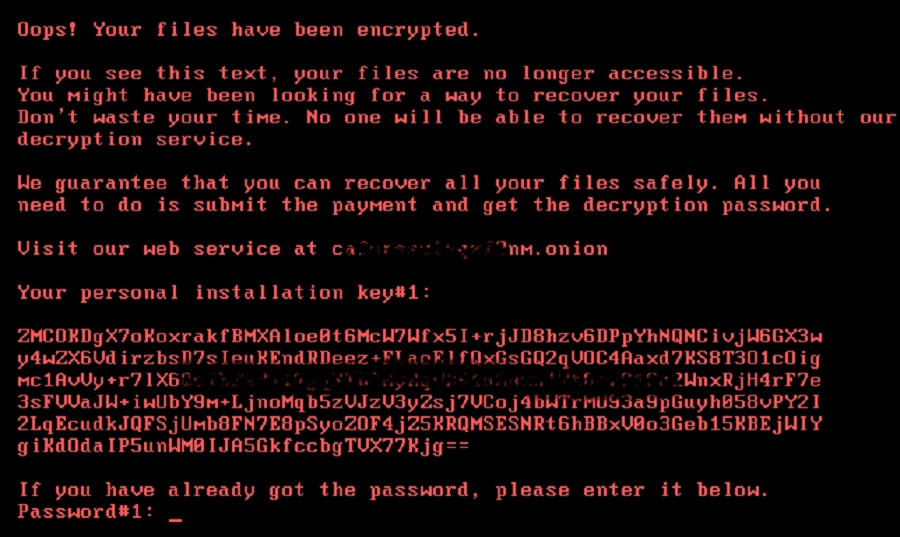
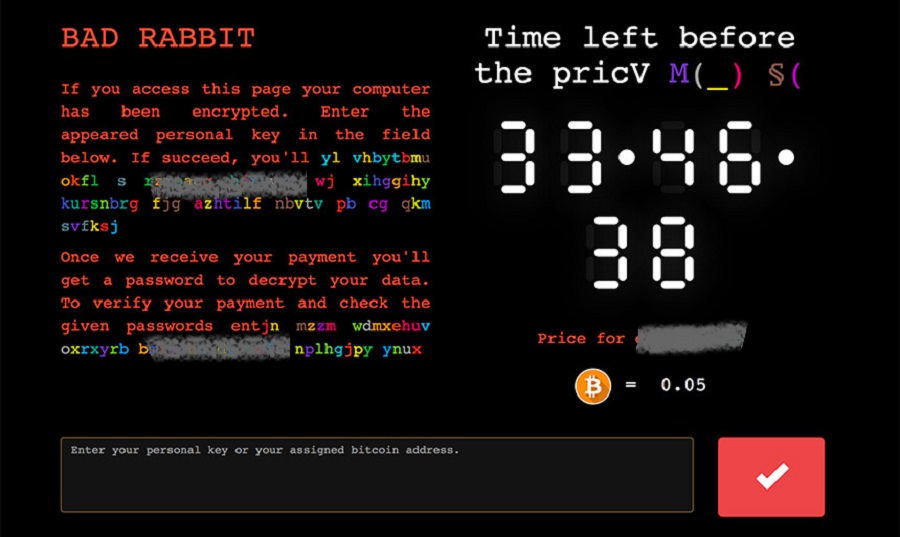
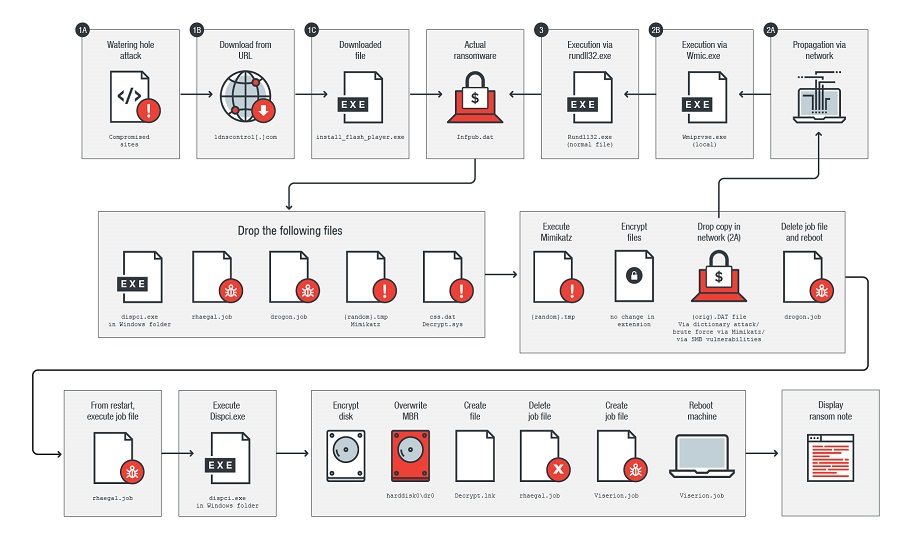
What is Bad Rabbit?
Attributed to the Russian cybercriminal group known as Black Energy; the threat group also believed to be behind NotPetya. This ransomware is used in targeted attacks against large companies, hospitals, and town/city networks.
The attacks started on hacked Russian media websites before moving to the US by using the popular social engineering trick of pretending to be an Adobe Flash installer. The ransomware demand is not a large ransom, but the success on decrypting this data has been very hit or miss. Victims usually have 40 hours to pay before the ransom amount goes up. Once they have gained access to your network, they deploy the Bad Rabbit ransomware against file servers, cloud servers, network storage, and databases.
Once files are encrypted, the original files remains in place but with a file extension of .locked. The ransom note provides instructions on how to pay the ransom using BitCoin. The total amounts we have seen are usually under $1,000.
This threat uses a very secure method of encrypting your data which means there is no decryptor available to recover your data. Although your data cannot be decrypted, USA Computer Services can restore your data from backups and get your network back up and running quickly and efficiently. One major flaw in Bad Rabbit, is that it does not delete Volume Shadow Copies. If your systems had that enabled, and has not been rebooted upon the completion of the encryption, we may be able to easily recover your data quickly.
When was Bad Rabbit first identified?
Bad Rabbit was first identified in October 2017.
How is Bad Rabbit spread?
Bad Rabbit is spread through legitimate websites that have been compromised by hackers. We have only seen Bad Rabbit use a fake Adobe update message to trick users into installing the software. It is possible that these websites lead to different malware, as such redirection services can be utilized by multiple actors at the same time. It is also spread through infected email attachments (macros) or torrent style websites, although this is very rare.
The "install_flash_player.exe" file is masquerading as an Adobe Flash update. The second payload replaces the MBR (Master Boot Record), created a .TXT file called README.TXT on the desktop, then the software encrypts the entire drive.
Did the hackers steal my data before encrypting it?
No, it does not appear that hackers are attempting to copy the data prior to encrypting it.
How long will recovery take?
This is always a tough question to answer. Since decryption is not possible at this time, the only option is to recover systems from backup. The amount of time this will take will depend on the size of your network, the amount of data infected, and the number of infected systems. USA Computer Services has the staff available to restore your systems as quickly as possible.
Can my data be recovered using a decryptor or is my data gone forever?
No, currently there is no decryptor available for Bad Rabbit, however, there are multiple ways to possibly recover your data from a Bad Rabbit attack, but you must act quickly.
These are the general steps cyber criminals take in a typical ransomware attack
1) Infection
After the ransomware has been delivered to the system via email attachment, phishing email, infected application or other method, the ransomware then installs itself on that endpoint and any/all network devices it can access from that system. This can include mapped network drives, backup storage, servers, databases, and other workstations.
2) Encryption Key Exchange
The ransomware program then contacts the control server operated by the cybercriminals behind the attack to generate the cryptographic keys to be used on the local system. This is how they are able to decrypt your data once the ransom has been paid. Some ransomware variants use a simple encryption algorithm while others use the same level of encryption the Military and financial institutions use.
3) Encryption of Data
The ransomware starts encrypting any files it can find on local machines and the network. It does this as "quietly" and as quickly as possible. What they are trying to do is get all of your data encrypted before you stop the process.
4) Extortion
With the encryption work done, the ransomware will now display the ransom and instructions for extortion and ransom payment, threatening destruction of data if payment is not made. There is usually a time limit which, if it expires, the decryption key may be deleted, or the price of the ransom may go up.
5) Unlocking or Recovery
Organizations can either pay the ransom and hope for the cybercriminals to actually decrypt the affected files (which in some cases does not happen), or they can attempt recovery by removing infected files and systems from the network and restoring data from clean backups. USA Computer Services never recommends paying the ransom. We have the experience in dealing with various ransomware attacks and there are almost always other alternatives if proper backup and disaster recovery steps were taken prior to the attack.
How to recover from a ransomware attack
1) Isolate
Prevent the infection from spreading by separating the infected computers from each other, shared storage, servers, and the rest of the network.
2) Identify
Identify the ransomware variant from the messages, cyber evidence on the computer, and various cybersecurity tools to determine which ransomware strain you are dealing with. You must quickly identify how the attack occurred and patch/close that security flaw. We may need to patch/update all systems, rebuild firewall configs, change all passwords, etc.
3) Report
Report to the authorities and coordinate measures to counter attack if the FBI or other governing authority requires assistance. You may also be required to notify your clients or customers that you have been a victim of a cybersecurity attack.
4) Create a list of recovery options
There are always a number of ways to deal with the infection and the recovery from the attack. We are here to help you make the best and quickest recovery decisions.
5) Restore
Using the most recent clean backups and program/software sources to restore your network/systems. Due to the disruption, you may need to consider new equipment and the latest software. We would have already identified this in step 4.
6) Prevention
Report on how the infection occurred and what you can do to put measures into place that will prevent it from happening again in the future.
Ransomware is a serious threat to your business.
USA COMPUTER SERVICES is a serious threat to RANSOMWARE!
Contact us now to begin your recovery process from Bad Rabbit today.
704-665-1619
Meet your USA Computer Services Team
Our USA Computer Services team members are skilled professionals who take great pride in their work. Our team will arrive on time, keep you informed, deliver what we promise and guarantee our work. We’ll also get to know what’s important to you so that we can customize the way we work with your daily routine.
Torrey Browne
President / Owner
Chris Murphy
Senior Technician
Chris Dent
Network Security Specialist
Caleb Epstein
Field Services Technician
Sean Murphy
Help Desk Technician
James Gossetr
Help Desk Technician
Jennifer Schatzl
Office Manager / Marketing
View MoreUSA Computer Services recovered our business from a ransomware attack and was able to save all of our data that was missing. Our old IT company never explained Ransomware to us but we are blessed you were able to save us.
Thomas. M - Plumbing Supply Warehouse

We provide IT services all over North and South Carolina
USA Computer Services provides the highest quality onsite and remote IT support. All of our products and support comes with an unconditional satisfaction guarantee. We specialize in Small and Medium sized businesses with all your IT needs. These are just some of the areas we can assist you. Call or contact us today to see how we can resolve your IT problems!
Charlotte
Mooresville
Gastonia
Cornelius
Belmont
Davidson
Bessemer City
Fort Mill
Huntersville
Belmont
Bessemer City
Charlotte
Cleveland
Cornelius
Cramerton
Dallas
Davidson
Fort Mill
Gastonia
Huntersville
Kannapolis
Kings Mountain
Lexington
Lincolnton
Lowell
Maiden
Mooresville
Mount Holly
Mount Pleasant
Rock Hill
Statesville
Vale
View MoreWe have been extremely happy with USA Computer Services for over 7 years. I highly recommend them for your computer needs.
- Charlene G. - Legal Firm
2023 Cybersecurity Statistics
USA Computer Services will stop at absolutely nothing to ensure our clients are protected against even the latest Cybersecurity threats.
Here are some statistics on the increasing threat of Cyber Crimes in 2023.
 0 Exposed records in the 1st half of 2023
 0 The global cost of Cyber Crime in 2023
 0 Number of reported scams/spoofs/hack attempts in 2023
 0 Average number of Cyber Crimes every day
Our computer problems have completely disappeared since partnering with USA Computer Services. They have the friendliest Tech's and they are always on-time for our appointments.
- Christina. W - Town Administrator
Ready to see how "We do IT Better"?
We take cybersecurity very seriously and can help your business recover from a Bad Rabbit ransomware attack. Once we have recovered your business, our proven solutions can prevent your company from being held hostage by hackers in another ransomware or cybersecurity attack. We are so confident that we can prevent a cybersecurity attack at your business that we back it up with a $1,000,000 protection plan. Contact us today to get your business running again!
Contact Us
Headquarters:
525 North Tryon St. #1600
Charlotte, NC 28202Additional Location:
859 Willard St #400
Quincy, MA 02169Additional Location:
60 State Street #700
Boston, MA 02129
